



Working from home has become more common than ever, and having a cozy, well-organized workspace is key to staying focused and comfortable throughout your day. Whether you’re tackling professional projects, managing household tasks, or creating personal art, your home workspace can have a big impact on your productivity and mood. Here are some helpful tips to create a space that feels both inviting and efficient.
Choose the Right Location
Finding the perfect spot for your workspace is the first step. Ideally, pick a quiet corner or a room with minimal distractions. If you have a spare room, that’s perfect. If not, a section of your living room or bedroom can work, but try to position your desk away from noise and heavy foot traffic.
Consider natural light
Natural light can boost your mood and increase focus. Position your workspace near a window if possible, but avoid direct glare on your screen. If natural light is limited, invest in good quality artificial lighting with adjustable brightness.
Invest in Comfortable Furniture
Comfort is crucial when you spend hours at your desk. An ergonomic chair with good lumbar support can prevent back pain. Adjust your chair height so your feet rest flat on the floor and your forearms are parallel to your desk.
Desk options
Choose a desk that fits your needs and fits well in your space. If space is limited, look for compact desks or standing desks to keep energy levels high by alternating between sitting and standing.
Organize Smartly to Reduce Clutter
A cluttered workspace can distract you and lower productivity. Use storage solutions like shelves, drawers, or desktop organizers to keep your supplies tidy. Label containers when necessary to find things quickly.
Use cable management
Manage cables with clips, ties, or sleeves to keep the area neat and prevent tangling.
Personalize Your Space
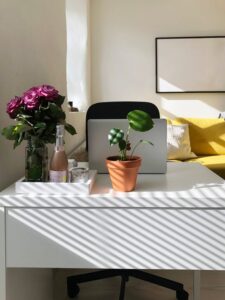
Adding personal touches can make your workspace more inviting. Plants, photos, or artwork can brighten the room and give you small moments of joy during your work day.
Choose calming colors
Colors like soft blues, greens, or warm neutrals create a soothing environment. Avoid overly bright or harsh colors that might cause distraction or discomfort.
Set Up Technology Thoughtfully
Make sure your devices are well positioned. Your computer monitor should be at eye level to avoid neck strain. Use external keyboards or mice if needed for ergonomic comfort.
Reliable internet and accessories
A strong internet connection is a must for smooth communication and work flow. Also, consider noise-canceling headphones if your environment is noisy. A good quality webcam and microphone are useful if you attend frequent video calls.
Create a Routine and Boundaries
Even with a great workspace, productivity depends on clear habits. Set regular work hours and take breaks to reduce fatigue. Inform family or housemates of your schedule to limit interruptions.
Include breaks and movement
Incorporate short breaks to stretch or walk around. This helps refresh your mind and reduce physical strain.
Maintain Cleanliness Regularly
Keeping your workspace clean adds to a sense of calm and order. Spend a few minutes at the end of each day wiping surfaces and organizing materials. This small habit sets you up for success the next morning.
Final Thoughts
Designing a cozy and productive home workspace doesn’t require a large budget or perfect conditions. By focusing on comfort, organization, and personalization, you can create an environment that supports both your work and well-being. Take time to adjust your setup as your needs evolve, and enjoy the benefits of a space made just for you.


More Stories
Tips for Creating a Relaxing Home Office Environment to Boost Productivity
Tips for Creating a Cozy and Inviting Home Office Space
Tips for Creating a Cozy and Inviting Home Office Space